
Rental Property Booking Software for Landlords
When people think of booking systems, they usually associate them with hotels or vacation rentals. But rental operations for long-term properties have evolved significantly over the past few years. Today, landlords are no longer just listing properties and waiting for inquiries. They actively manage demand, coordinate visits, and maintain communication with multiple prospects at once.
This shift has made manual coordination increasingly difficult. Calls, messages, and ad-hoc scheduling might work when inquiry volume is low, but they quickly become inefficient as demand increases. Missed calls, delayed responses, and scheduling conflicts can all impact how quickly a property gets occupied.
This is where rental property booking software becomes valuable. It introduces structure into how landlords handle inquiries, schedule property tours, and manage follow-ups. Instead of reacting to each request individually, landlords can rely on a system that standardizes the process.
The result is not just better organization, but also better outcomes. Faster responses, smoother scheduling, and consistent follow-ups all contribute to improved tenant conversion and reduced vacancy periods.


How Landlords Use Booking Engines for Property Tours
Property tours are one of the most critical steps in the rental journey. They represent the moment when a prospective tenant moves from interest to evaluation. However, many landlords still manage this stage informally, relying on back-and-forth communication to finalize a time.
This approach creates friction. Tenants often have to wait for responses, adjust their schedules repeatedly, or lose interest if the process takes too long.
Booking engines remove this friction by introducing a structured flow.
Instead of negotiating timings, landlords define their availability in advance. Tenants can then view available slots and select a time that works for them. The system confirms the booking instantly, without requiring manual intervention.
This creates a smoother experience for both sides. Tenants get clarity and speed, while landlords reduce the time spent on coordination.
In practical terms, booking engines help landlords:
- Reduce repeated conversations around scheduling, especially when handling multiple inquiries at once
- Ensure that every inquiry progresses quickly without delays caused by manual confirmation
- Maintain consistency in how property tours are scheduled across different properties
Over time, this structured approach improves both efficiency and professionalism. Tenants are more likely to engage with a process that feels organized and responsive.
Scheduling Property Viewings Without Confusion
Scheduling might seem like a simple task, but it becomes increasingly complex as inquiry volume grows. Landlords need to manage availability across multiple properties, avoid overlapping visits, and ensure that each viewing receives adequate time.
Without a system, this often leads to confusion. Double bookings, missed appointments, and last-minute changes become common, especially when everything is tracked manually.
A booking system introduces clarity by organizing schedules around predefined rules.
Instead of adjusting availability for each request, landlords set clear parameters for how scheduling should work. The system then manages bookings within those parameters.
For example, landlords can:
- Define fixed time slots for each property, ensuring that availability remains clear and consistent
- Add buffer time between visits, allowing for travel, preparation, or unexpected delays
- Control the number of bookings within a given timeframe, preventing overcrowding or rushed interactions
This structured approach reduces reliance on manual tracking. Landlords no longer need to remember every scheduled visit or coordinate across multiple conversations.
Instead, they operate within a system that maintains order automatically.
This becomes especially important when managing multiple properties or handling a high volume of inquiries. A well-structured schedule ensures that operations remain smooth, even as demand increases.
Automating Follow-Ups With Interested Tenants
Follow-ups play a critical role in converting property visits into confirmed tenants. After a visit, prospects are actively comparing options, and timely communication can influence their decision.
However, maintaining consistent follow-ups becomes difficult when handled manually. With multiple leads at different stages, it’s easy to miss a message or delay a response.
Booking software addresses this by automating follow-up workflows.
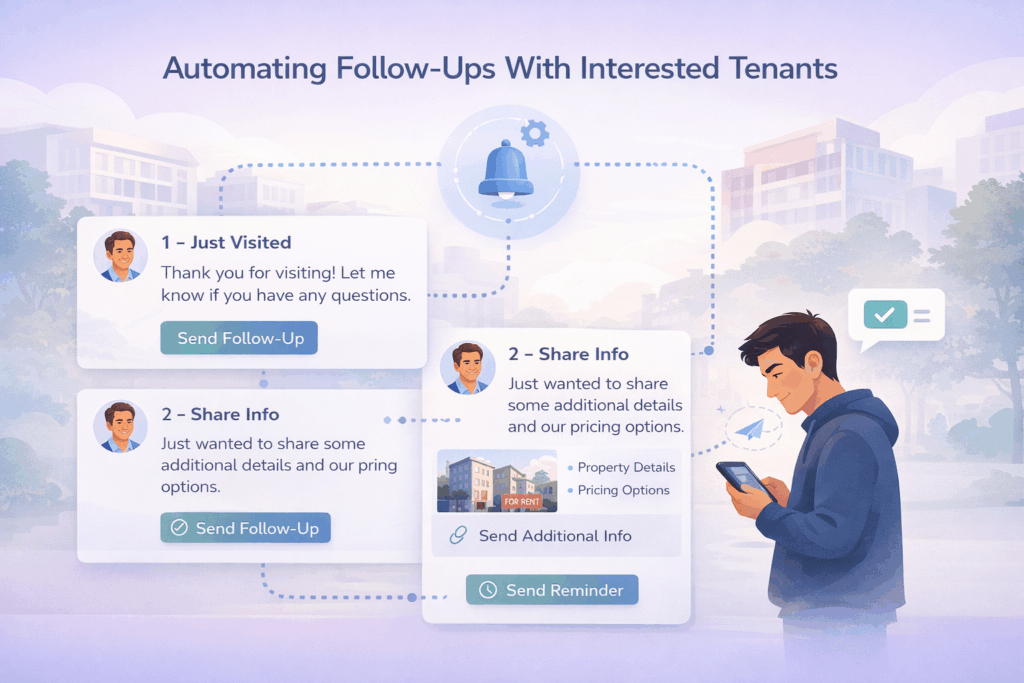
Once a visit is completed, the system can trigger a series of actions without requiring manual input. These typically include:
- Sending a follow-up message immediately after the visit to maintain engagement
- Sharing additional property details, pricing information, or next steps to guide the tenant
- Sending reminders or nudges if the tenant does not respond within a defined timeframe
This ensures that every prospect receives timely communication, regardless of how many inquiries the landlord is handling.
More importantly, it creates consistency. Every lead goes through the same structured follow-up process, reducing the chances of missed opportunities.
Eliminating Double Scheduling and Missed Visits
Scheduling conflicts are one of the most common operational challenges in rental management. When availability is tracked manually, errors are inevitable. Double bookings, overlapping visits, and missed appointments can disrupt operations and create a poor experience for tenants.
A booking system eliminates these issues by managing availability in real time.
When a tenant selects a time slot, the system updates availability instantly. This ensures that the same slot cannot be booked again. All scheduling data remains centralized and up to date.
In addition to preventing overlaps, booking systems also reduce no-shows through automated reminders.
For example:
- Tenants receive notifications before their scheduled visit, helping them remember their appointment
- Easy rescheduling options allow tenants to adjust timings instead of missing visits entirely
These small improvements significantly enhance scheduling reliability.
Over time, landlords spend less time dealing with disruptions and more time focusing on serious prospects.
Managing Multiple Properties With Greater Control
As landlords expand their portfolio, operational complexity increases. Each property may have different availability, different demand patterns, and different scheduling requirements.
Managing all of this manually becomes difficult.
Booking software helps centralize operations across properties. Landlords can manage schedules, track inquiries, and monitor availability from a single system.
This unified view provides better control and visibility.
For instance, landlords can:
- Identify which properties are receiving more inquiries and adjust focus accordingly
- Understand which time slots are most in demand and optimize scheduling
- Allocate time more effectively based on property performance
This level of insight is difficult to achieve without a structured system.
Over time, landlords can use this data to improve their overall rental strategy.
Free Tools vs Structured Booking Systems
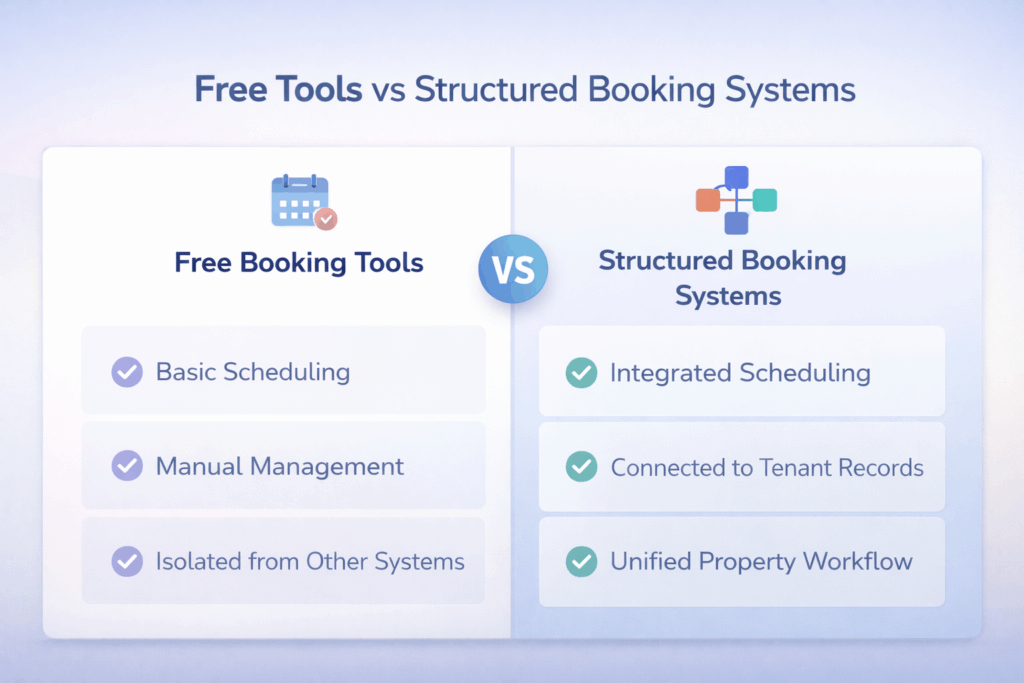
Many landlords start with free booking tools, which provide basic scheduling functionality. These tools can help reduce manual effort in the early stages.
However, as operations grow, their limitations become more apparent.
Free tools often operate independently. They do not connect with tenant records, property availability, or broader workflows. This means landlords still need to manage different aspects of their operations separately.
In contrast, structured booking systems integrate scheduling with overall property management.
This integration allows landlords to:
- Align booking schedules with real-time property availability
- Connect inquiries with tenant records for better tracking
- Maintain a unified workflow instead of relying on multiple tools
This shift from isolated tools to an integrated system is what drives real efficiency.
How RentOk Helps You Structure Your Booking Workflow
RentOk is designed to bring structure to rental operations by connecting booking with property management.
Instead of treating scheduling, tenant tracking, and occupancy as separate tasks, it combines them into a single workflow. This allows landlords to manage their operations more efficiently and with greater clarity.
With RentOk, landlords can:
- Track inquiries and viewing schedules together, ensuring that no lead is missed
- Monitor property availability alongside bookings, maintaining accurate and real-time visibility
- Manage occupancy and tenant movement within the same system, reducing the need for multiple tools
This integrated approach becomes especially valuable for landlords managing multiple properties or handling a high volume of inquiries.
By centralizing operations, RentOk reduces manual effort and improves consistency across the entire rental process.
Turning Property Tours Into Confirmed Tenants
Property visits are only one part of the rental journey. What matters more is how efficiently that visit leads to a confirmed tenant.
A structured booking system ensures that every step, from scheduling to follow-up, is handled consistently. This reduces delays, improves communication, and creates a smoother experience for tenants.
Over time, this directly impacts occupancy and overall efficiency.
If your current process still relies heavily on manual coordination, adopting a structured approach can make a noticeable difference.
Explore RentOk to simplify property tour scheduling, automate follow-ups, and manage your rental bookings with greater clarity and control.